Writing formulaic SEO content, updating old articles, reporting on blog performance, even running complicated performance analyses… these are all things Agent A does for me.
Here are some of our favorite Agent A use cases for content marketers.
Agent A is a marketing agent from Ahrefs—essentially an AI assistant with direct, unrestricted access to the full Ahrefs dataset that can carry out marketing and SEO tasks autonomously, rather than just answer questions.
It’s a workspace where a long-running AI agent builds, runs, and maintains tools for you, on infrastructure it controls. It is not just a chatbot you ask questions to. It is closer to a junior engineer who happens to have a deep SEO background, a Postgres database, a Flask server, and access to all the frontier LLMs.
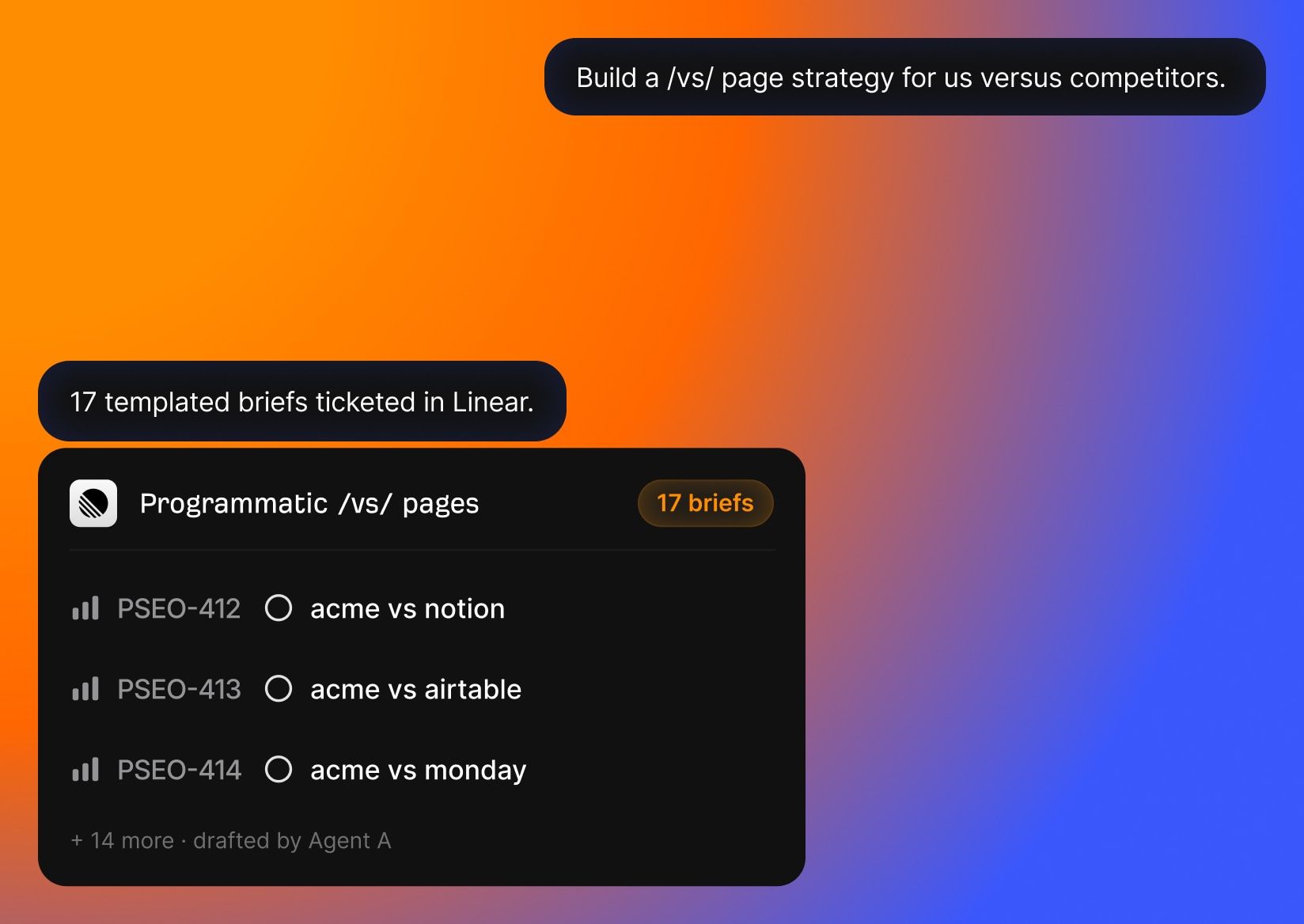
Here’s how Agent A is different from ChatGPT, Claude Code, or even using the Ahrefs API or MCP:
- Unrestricted access to Ahrefs endpoints. Every endpoint we use to build Ahrefs is available to Agent A, including many you can’t access via API or MCP: Keywords Explorer, Site Explorer (101 endpoints alone), Brand Radar, Web Analytics, GSC integration, AI Content Helper, Site Audit, Rank Tracker, Content Explorer, Batch Analysis… You can even create and update projects in Ahrefs just by talking with Agent A.
- Serious tech stack underneath. Agent A is like a marketing Swiss army knife, with all the tech and gadgets you need to build applications and reports in the right way. Not to get too technical, but Agent A knows precisely how to turn your big ideas into Postgres databases, Flask apps, and scheduled cron jobs. It uses webhooks, an OpenRouter LLM proxy with 300+ models, web fetch with full-page parsing, PDF extraction, OCR…
- Built-in connections to all your marketing tools. You can use native connectors for Slack, HubSpot, GitHub, Notion, Linear, Mailchimp, Resend, SendGrid, Stripe, Gong, WordPress, Airtable, Reddit, Apify, and even Semrush—in case you want to migrate to Ahrefs 😉
- Expert skill and app library. The Ahrefs team (myself included) has contributed pre-built marketing skills and applications that let you automate crucial marketing processes the precise same way an experienced Ahrefs power user would.
Here’s how we’re using Agent A to automate content marketing:
So Agent A ran the analysis for me. To get a little technical, the Blog Semantic Audit mapped every URL on our blog into vector space, computed a site centroid, and bucketed pages by their cosine distance into core/near/mid/far.
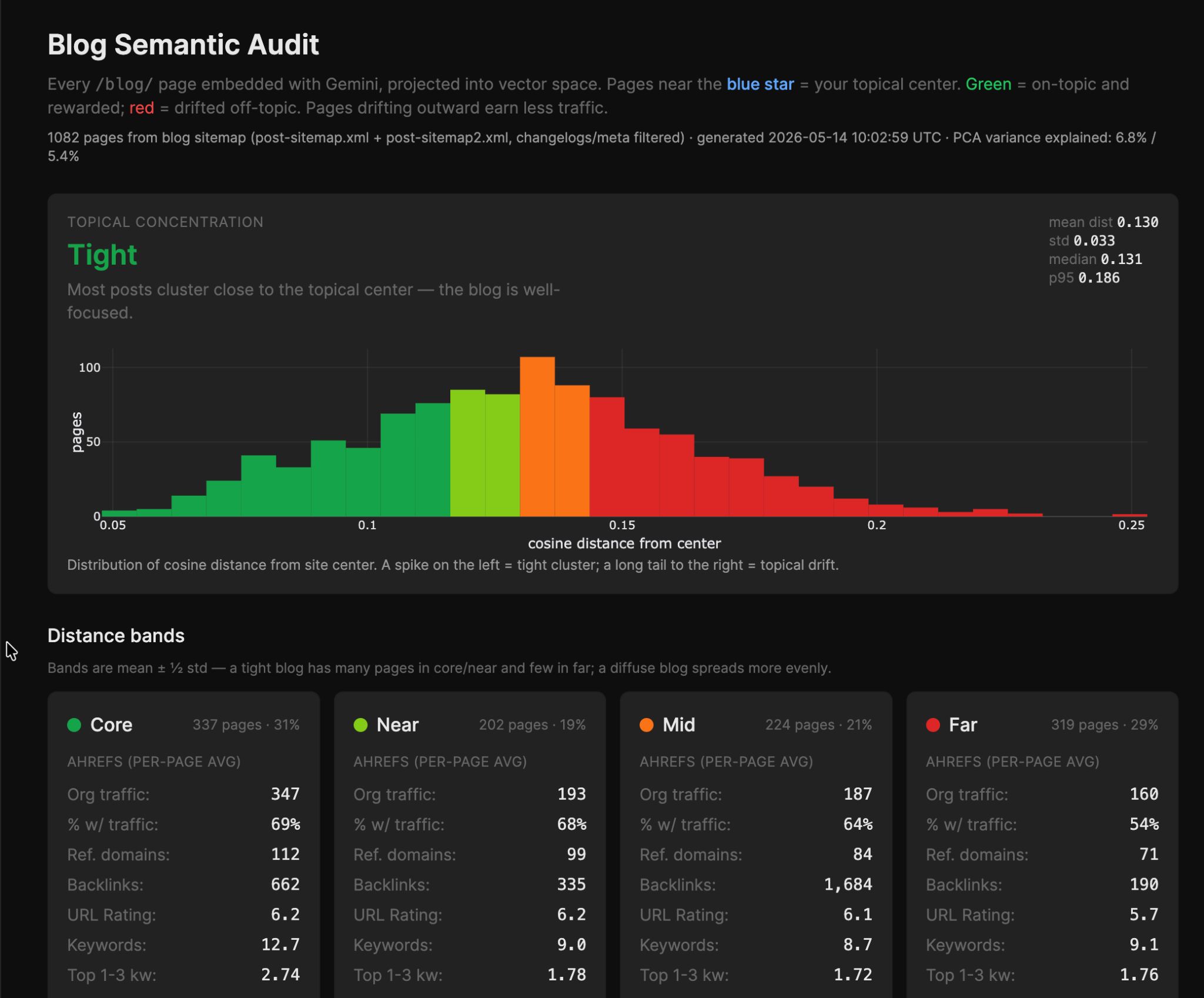
Then it enriched every page with Ahrefs traffic data, so each bucket shows you average organic traffic, referring domains, UR, and keyword coverage. It even grouped related articles together to highlight natural topic clusters.
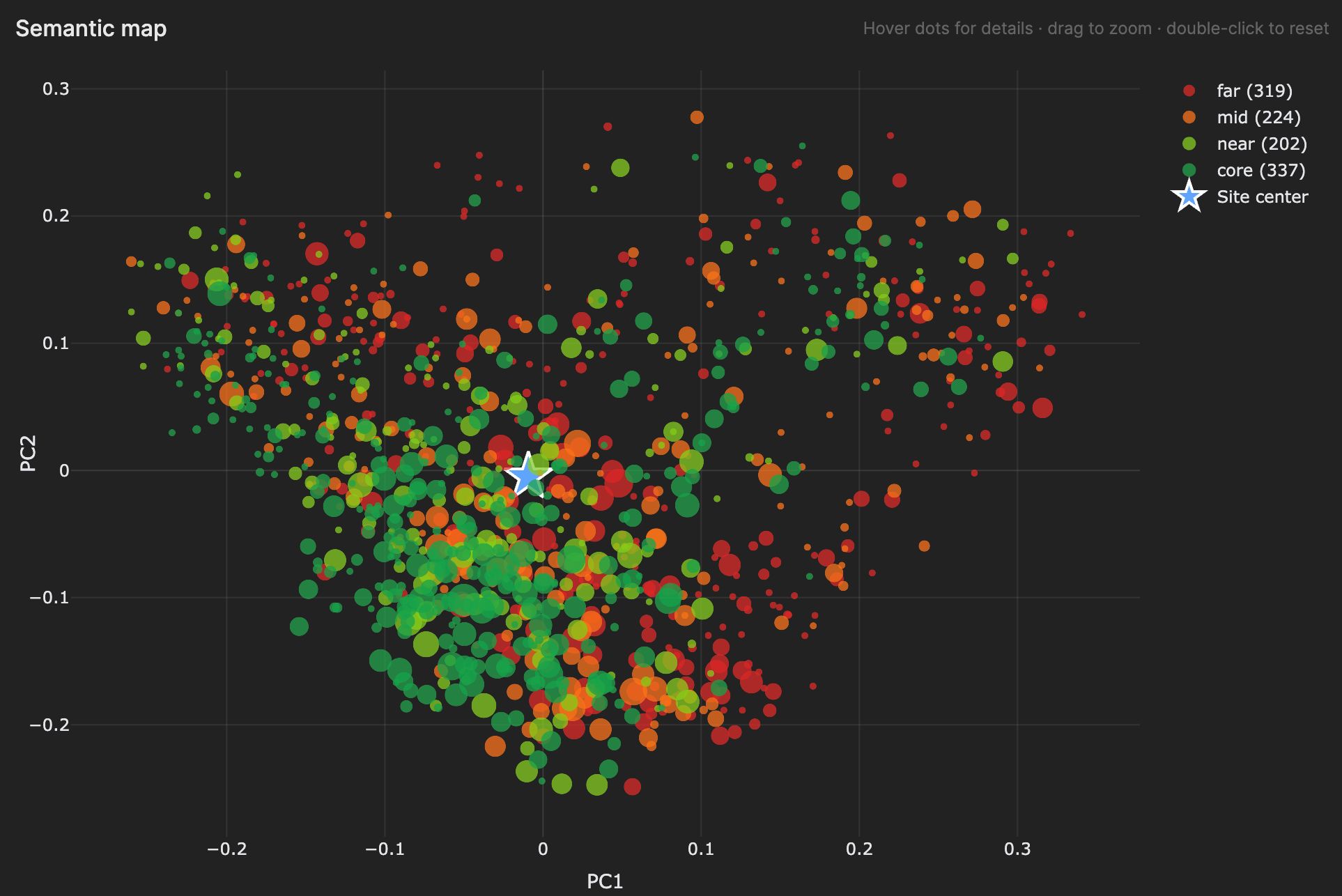
The result answers a question I always wanted to answer: “Do my off-topic posts underperform my core posts, and by how much?” On our blog, the answer is yes: core pages get roughly 2× the traffic of far pages.
Starter prompt:
Run a semantic audit of my blog. Pull every URL from the sitemap, fetch the content, embed each page (mean of passage embeddings) using a 3072-d embedding model. Compute the site centroid and bucket pages by cosine distance to it (core/near/mid/far using mean ± 1/2σ — not quartiles). Enrich each URL with Ahrefs batch analysis (org_traffic, refdomains, UR, keywords). Run k-means with silhouette scan (k=2..12) to find natural topic clusters. Output: bucket histogram, per-bucket Ahrefs averages, cluster summaries with sample URLs, and a verdict on whether the blog is tight or diffuse.
I spend a lot of time reviewing competitor blogs and looking for article inspiration. When I asked Agent A to help, it built a tool called Competitor Feed.
Competitor Feed watches a list of competitor blog sitemaps and surfaces new posts each day. Each post is saved with a title, publish date, first-paragraph excerpt, and a one-line LLM summary. I then triage each item as save/dismiss/ignore: good ideas get saved into my backlog of content ideas.
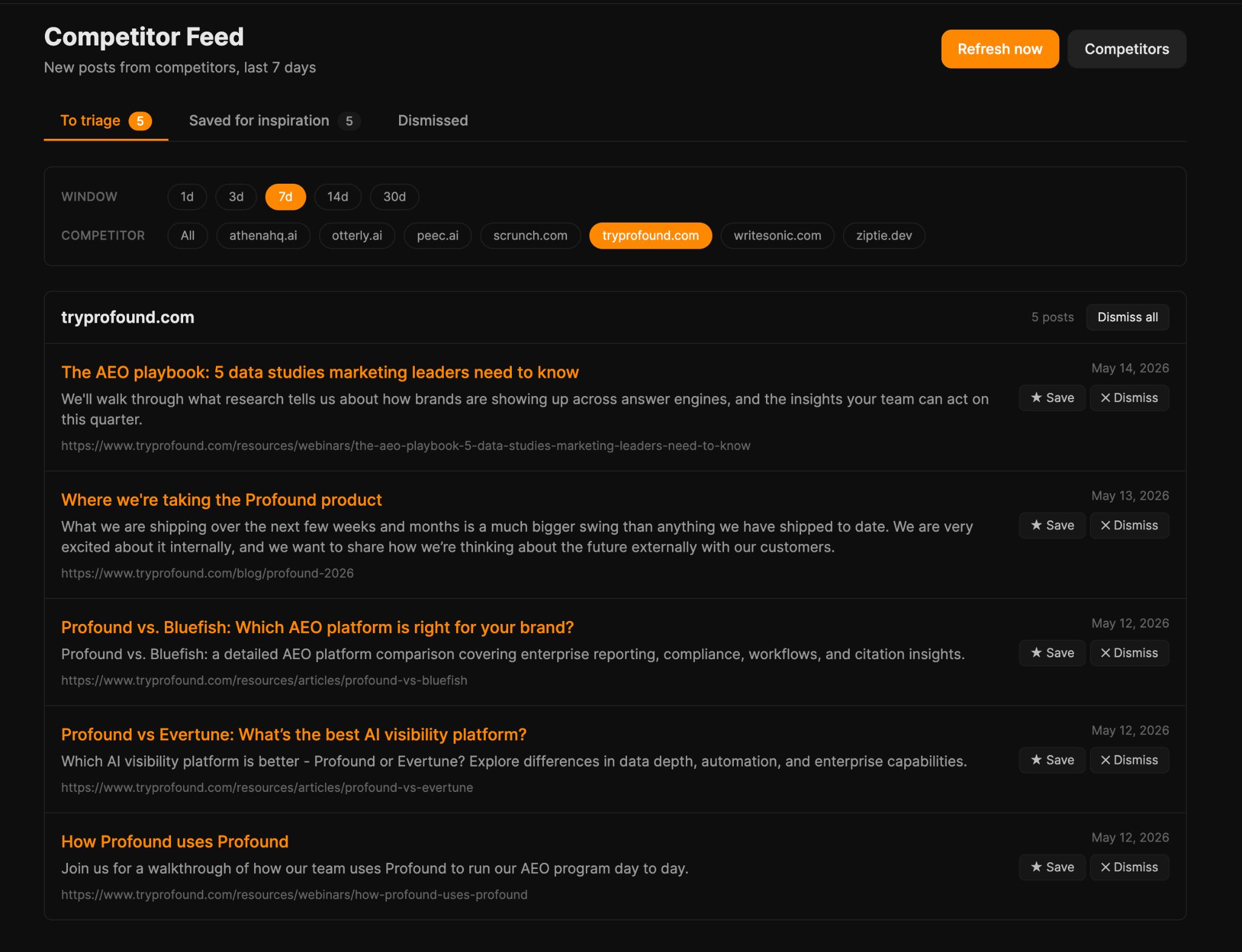
When you save a post, the app fires an Ahrefs Keywords Explorer pipeline against the title: it extracts a 2-3 word seed topic, fetches keyword suggestions, ranks them by volume and intent, and attaches the results to the saved row.
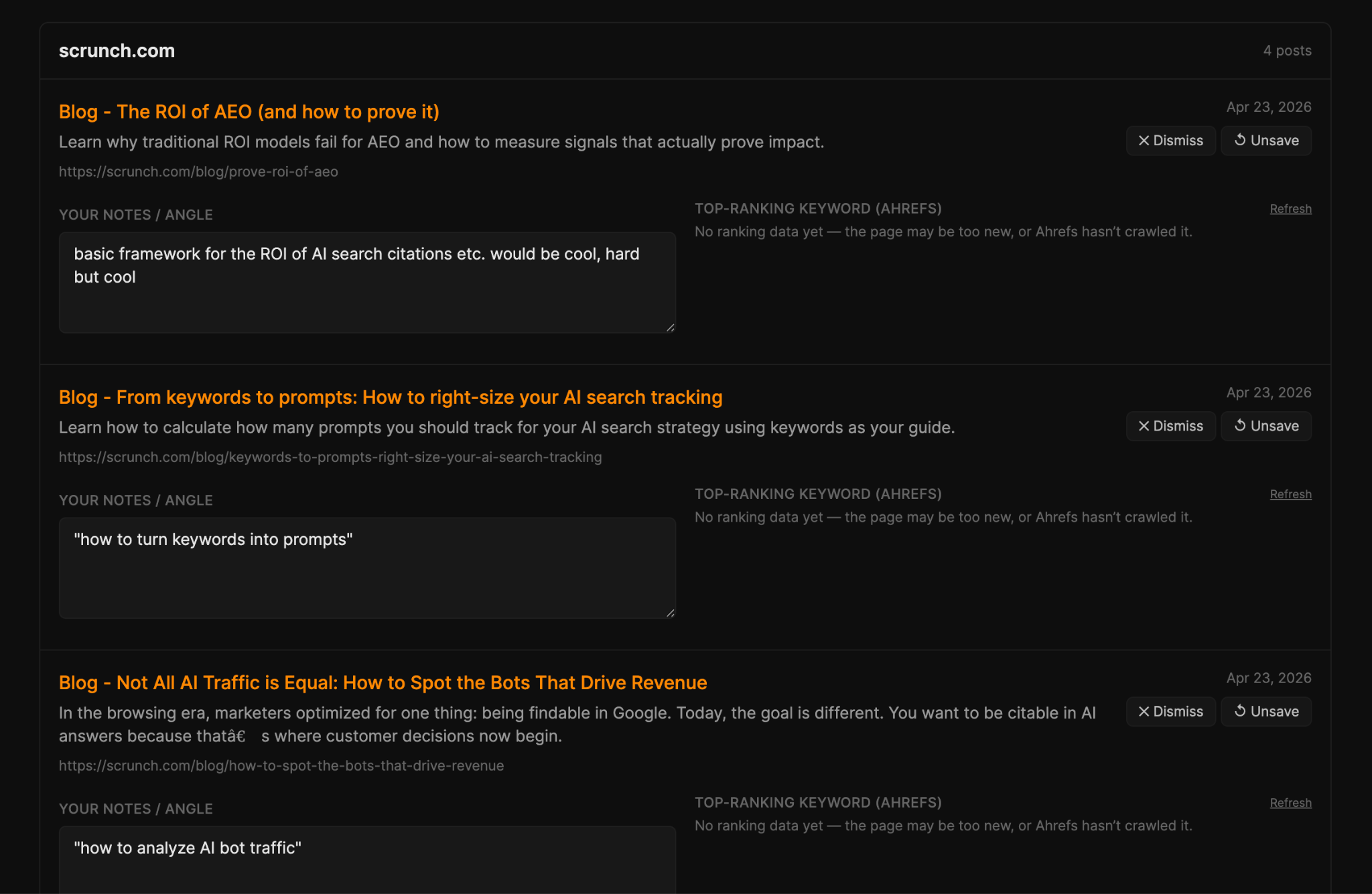
So “competitor watching” stops being a passive feed and turns into an active keyword pipeline: every interesting competitor post produces a list of keywords we could go after on the same topic.
Starter prompt:
Build me a competitor blog watcher. I configure a list of competitor blog sitemap URLs. A daily job diffs each sitemap, fetches new URLs, and for each new post shows title, publish date, first-paragraph excerpt, and a one-line LLM summary of the angle. Triage states: new / saved / dismissed. When I save a post, run an Ahrefs Keywords Explorer pipeline against the title: extract a 2-3 word seed topic, fetch keyword suggestions, rank by volume and intent, attach results to the saved row. The output is competitor-inspired keyword lists, not a passive reading queue.
Louise built the LinkedIn Scrapbook, her own personal swipe file for content inspiration. She uses Obsidian Web Clipper to save LinkedIn posts as Markdown in her Scrapbook app, complete with full text, author, engagement metrics, and media.
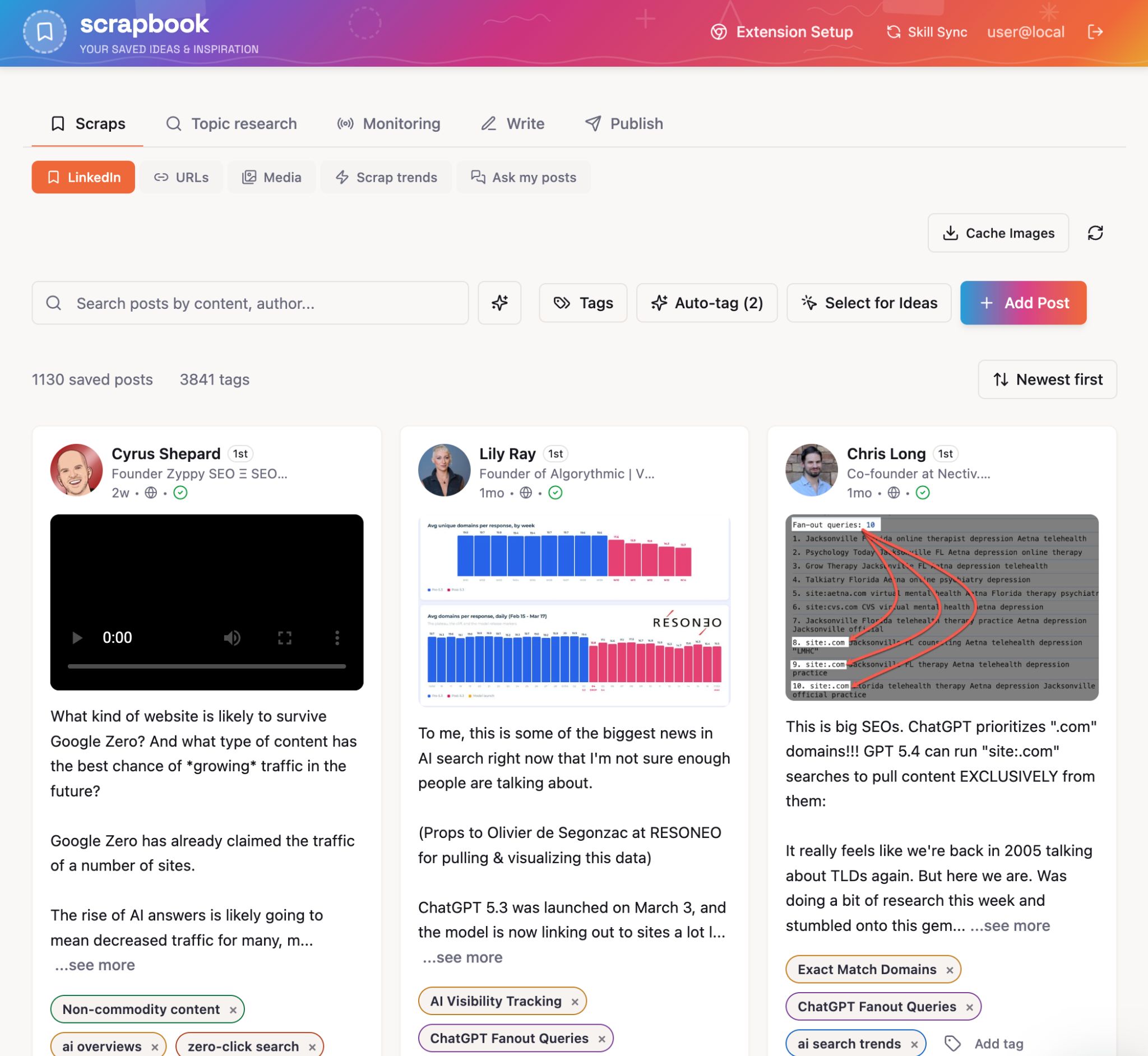
Scrapbook becomes very interesting when you’ve saved some content, care of all the extra tools Louise added, like:
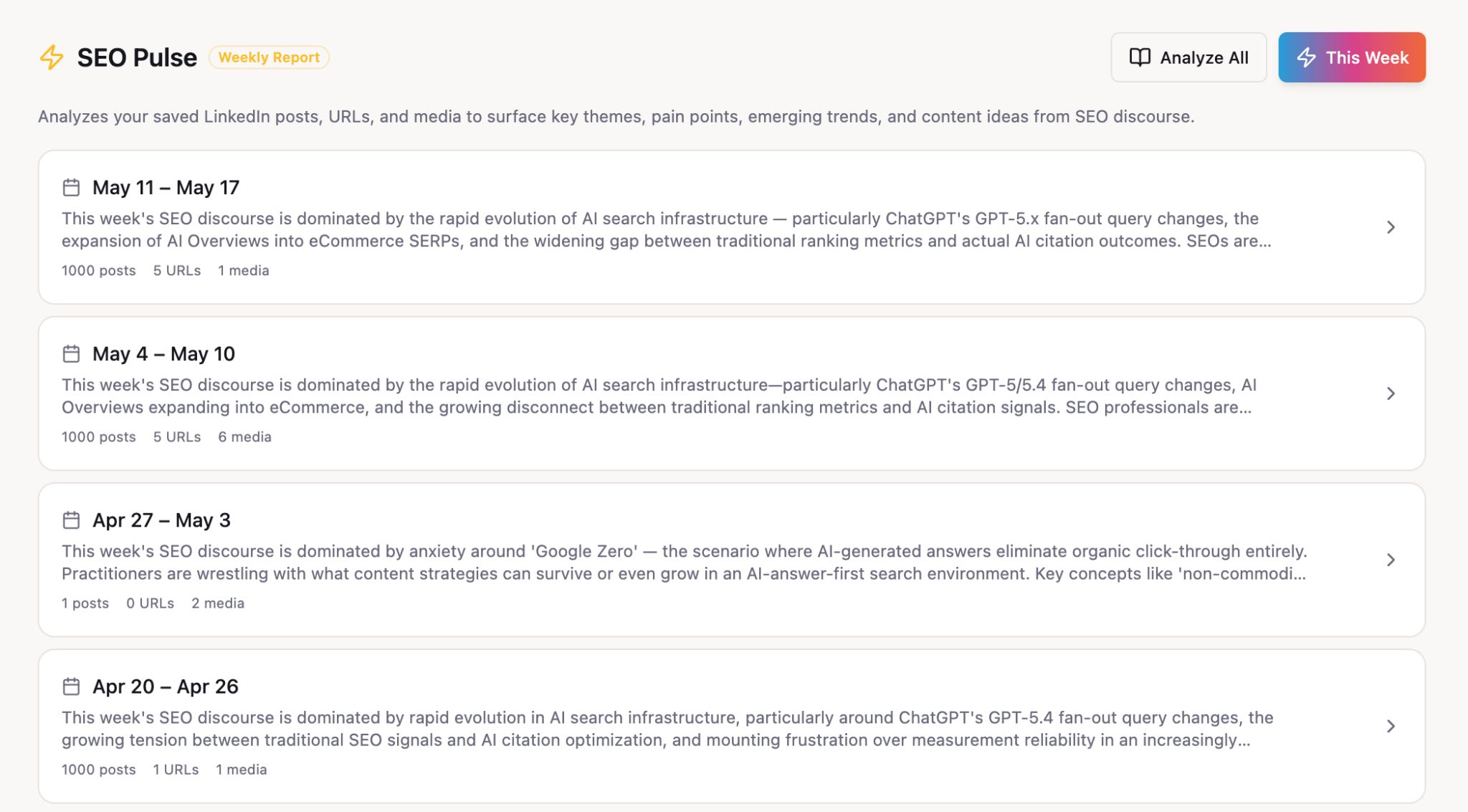
- Trending keywords: this reveals keywords rising in popularity across the posts you’ve saved, so you can spot themes your network is gravitating toward before they hit the SEO press.
- Content gap: compares topics in your saved posts against topics you’ve published, with the intent of surfacing “things you’re consuming but haven’t written about”.
- Example finder: when you’re drafting an article and need a relevant example, you can use semantic search across the scrapbook to return relevant content.
- Ask your scraps: query your database of saved snippets (with questions like “which scraps mention AI Overviews?”).
Starter prompt:
Build me a LinkedIn swipe-file app with a Chrome extension. The extension adds a "Save to Scrapbook" button to every LinkedIn post; one click captures post text, author, engagement metrics, and media URLs and POSTs to my Console app. The Console app stores posts in Postgres with full-text search. Build three tools on top of the corpus: (1) Trending Keywords — extract topic seeds from saved posts, surface rising topics over a rolling window; (2) Content Gap — diff topics in saved posts against topics in my published blog posts, output what I'm consuming but haven't written about; (3) Example Finder — semantic search over the scrapbook with deep links back to LinkedIn. Add a generic web-clipper extension too for non-LinkedIn URLs.
7. Get scientific internal linking recommendations
Internal linking is one of those SEO chores that “should” get done every time we publish and almost never does.
So I got Agent A to build the Internal Linker. Feed it a new article (either a published link, or pasted draft markdown for unpublished pieces) and it finds the most relevant existing posts that should link to it.
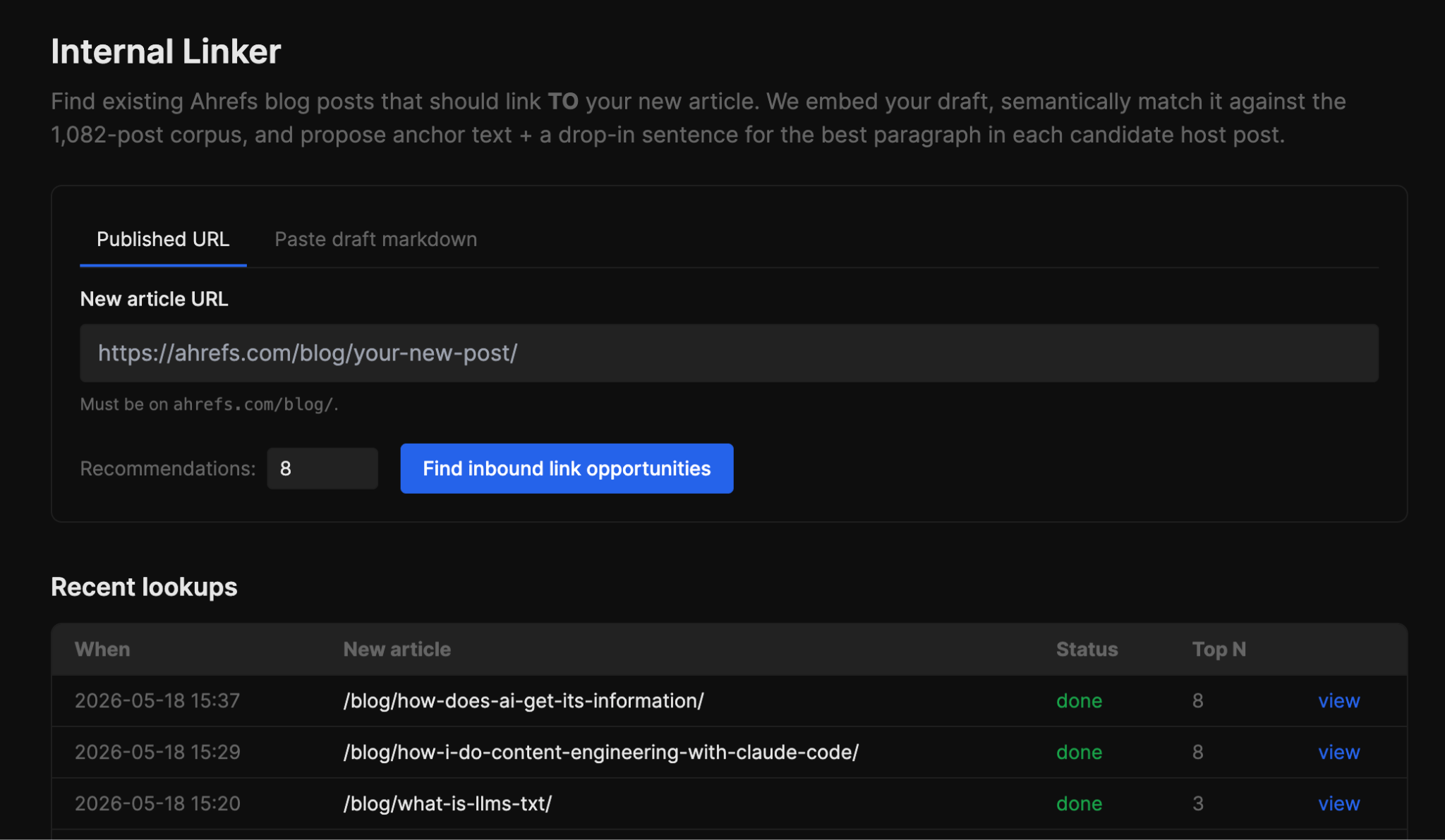
Under the hood, it embeds the input article with Gemini and cosine-compares against all other articles from our sitemap. The top candidates then get rescored with a special traffic weighting to prioritize links from articles with lots of existing organic traffic.
It also auto-excludes any post already linking to you, parsed from each candidate’s markdown body, so you’re not staring at recommendations you’ve already used.
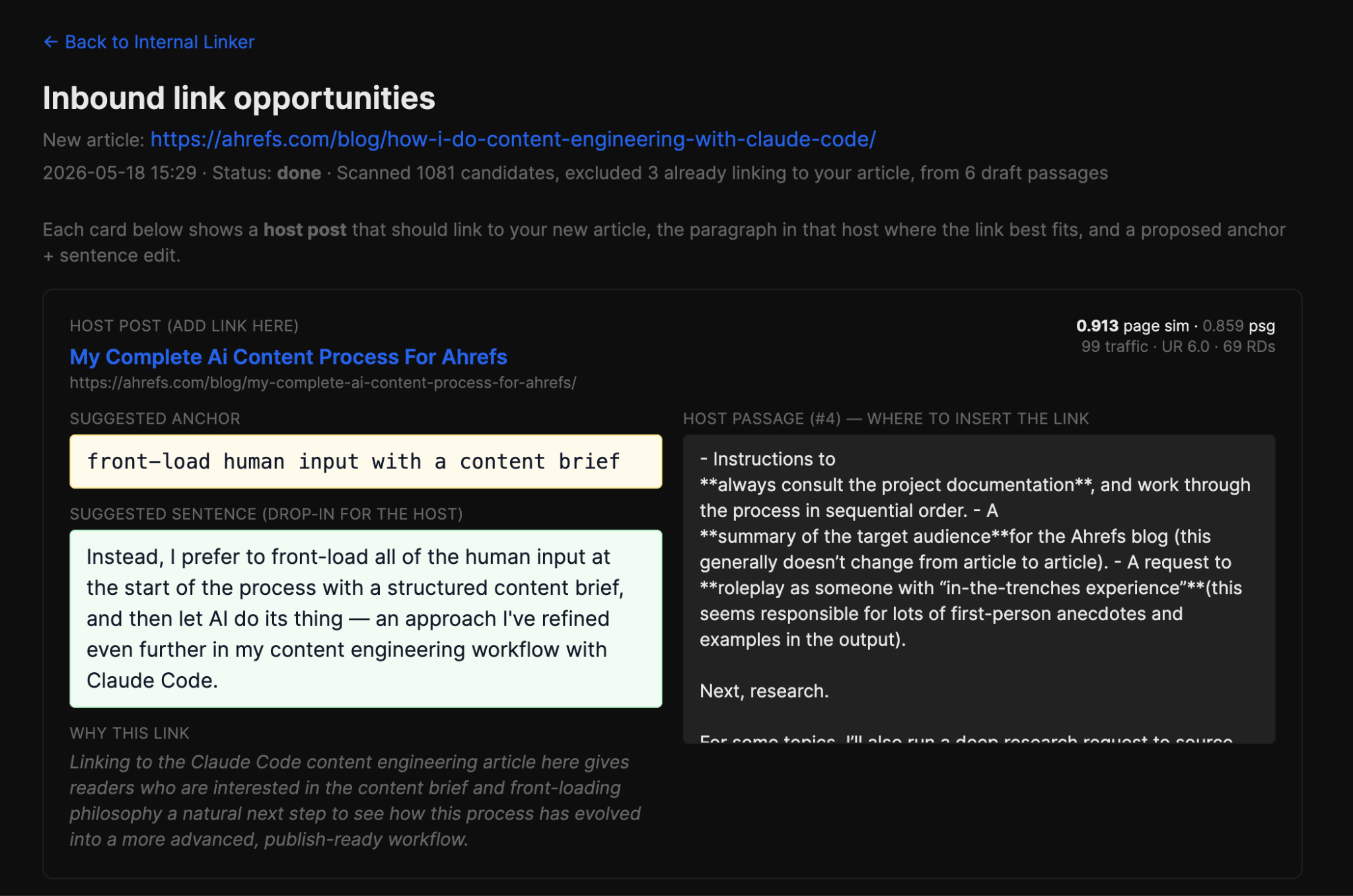
For each recommended article, the tool also identifies the single paragraph most semantically aligned with your new article. Then Claude Sonnet 4.6 drafts a natural 2-6 word anchor and rewrites that paragraph’s sentence to include it, ready to paste straight into the existing article.
Starter prompt
Build me an internal-linking tool. Input: either a published blog URL or pasted draft markdown for unpublished pieces. Embed the input article with Gemini and cosine-compare against my pre-cached blog post vectors. Rescore top candidates with authority weighting: 0.7 × similarity + 0.3 × log(org_traffic) — favours high-traffic hosts where a link actually moves rankings. Auto-exclude any host already linking to me (parse each candidate's markdown body). For each top host, identify the single paragraph most semantically aligned with the input article — that's where the link goes. Have Claude draft a natural 2-6 word anchor and rewrite a sentence in the host paragraph to include it. Per-recommendation context: page sim, passage sim, host's org_traffic / UR / refdomains, the host paragraph, and a one-line rationale. Cache passage vectors per host so repeat lookups are instant. Run lookups async with live step status; persist every lookup to history.
Final thoughts
If you’re an Ahrefs customer, you can try Agent A for free for one month.
Test out some of these prompts for inspiration, build some applications and generate some reports, and see just how much of the tedious parts of your job Agent A can tackle for you.
Similar Posts

Release Day: The Drupal Recipes API
We recently completed a new set of tutorials covering the Drupal Recipe API. My interest in Drupal…

Ellipal Wallet Email Hacked (THIS Pisses Me Off)…
Buy a Tangem Wallet (20% off + free BTC + free shipping): https://tangem.com/en/pricing/?promocode=CYBERSCRILLA&promocode=BLOOMX26&promocode=SHIPZERO Get Trezor Wallet (10%…

No Pong: From startup to multinational with WooCommerce
No Pong is one of the most popular natural deodorant brands in Australia. They launched on WooCommerce…

These NEW Crypto Scams are catching EVERYONE off guard…
🔥 Order a Tangem Wallet (30% Off + Free Bitcoin): https://tangem.com/pricing/?promocode=CYBERSCRILLA&promocode=NYEXTRA26 🔥 Want to join Scrilla’s private…

NEW Tangem Wallet Flaw EXPOSED (What You Need to Know)
Here are the deals: • 20% off Limited Edition Cards (Sun Drop, Ramen Cat, and Bitcoin designs)…
How to move your custom site to WooCommerce
Running your ecommerce business on a custom-built platform can make scaling with flexibility and control a real…